2024年9月14日土曜日

Raspberry pi OS 12 (bookworm) で NetworkManager を使用しない

Raspberry Pi OS が bookworm の場合は、NetworkManager が標準ですが、

Redhat系で、過去に使いにくさを経験してたので、

古来からの(?) /etc/network/interfaces  の設定に変更しました

1. interfacesファイルの作成

# cat interfaces

#wpa-roam /etc/wpa_supplicant/wpa_supplicant.conf

#iface default inet dhcp

allow-hotplug wlan0

auto wlan0

#iface wlan0 inet dhcp

iface wlan0 inet static

        address 192.168.xxx.yyy

        netmask 255.255.255.0

        gateway 192.168.xxx.yyy

wpa-ssid "xxxx"

wpa-psk "ppppp"

dns-nameservers 192.168.xxx.yyy

iface wlan1 inet static

        address 192.168.xxx.yyy

        netmask 255.255.255.0

        gateway 192.168.xxx.yy

wpa-ssid "xxxxx"

wpa-psk "ppppp"

auto lo

iface lo inet loopback

auto eth0

iface eth0 inet static

        address 192.168.xxx.yyy

        netmask 255.255.255.0

        gateway 192.168.xxx.yy

dns-nameservers 192.168.xxx.yy

2. NetworkManagerの無効化及び停止

   sudo systemctl disable NetworkManager

   sudo systemctl stop NetworkManager

3. resolv.confの手動設定

 # cat resolv.conf

   # Generated by NetworkManager

    nameserver 192.168.xxx.yy

4. reboot

  以上


2024年1月6日土曜日

久々にネジザウルス使う 感動

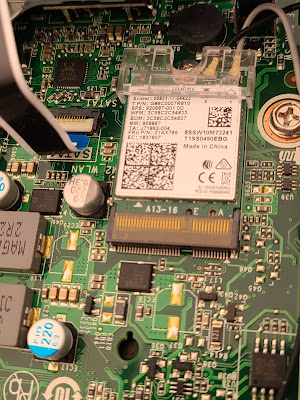
 ThinkCentre M75q-1 Tiny の

WiFi 5 モジュール(intel Wireless-AC 9260)を交換(ダウングレード)しようとして

見た目ちょっとやばそうな螺子だなと思ったんだが他で実績のあるドライバーで

回すと、どんどんなめていく。。

おまけに、余計なアンテナ端子ガードが付いてて、ネジザウルス使うのに邪魔

そのガードをやっと外して、

さら螺子だったけどネジザウルスでするすると廻った

のに感動です!!


2023年11月30日木曜日

Wifi Card Replacement Lenovo Thinkpad L390 from AC-9560 to Wi-Fi 6E AX210 OK!!

Thinkpad L390ですが、

 ネットで調べても、

CNVi対応の無線LANカードモジュールしか使えないとの情報はあるんですが、

非CNViカード(Eキーだけ、Aキーなし)が使えたとの情報がありませんね。


試してみました。

何の問題も無く使えましたね。

AX対応のルーターに接続出来ました。

リンク速度: 1201(Mbps)     でした。

2023年3月6日月曜日

Sockets not releasing for Pico_W

 https://github.com/micropython/micropython/issues/10812

の方と同様の現象発生で、昨日悩まされてました。

You need to close the waiting (bound on port 80) socket, otherwise you won't be able to make a new one on the same port.

しょうがないので、とりあえず、bind(addr)を正常終了までリトライするコード

に変えてみました。

以下、コード例

....

# Open socket

addr = socket.getaddrinfo('0.0.0.0', 80)[0][-1]

s = socket.socket()

##s.bind(addr)

bs="addr"

ec=0

while bs!=None:

  try:

    bs=s.bind(addr)

  except OSError:

    ec=ec+1

    print("EADDRINUSE?? " + str(ec))

  utime.sleep(1)

  print('s.bind(addr) rt ', bs)

s.listen(1)

print('listening on', addr)

....

とりあえず、

最悪でも、2分以内に、bind出来た。。


2023年2月22日水曜日

micro:bit V1 でちょっと遊ぶ

 昨年の暮れぐらいからマイコンの整理を始めてました。結局Arduino系は、ブートローダーの最新化で、殆ど動いたので(20台位)、結局塵は減らない。
ごく最近、箱の中で眠っていたmicro:bit V1 を発見!!  
Micropython を最新化してちょっと遊んでみました。今更面白いと思うのはボケて来たせい?!
入時(2017年らしい)は、ちょっと触って、うーん(!?)でお蔵入りでした。
今回、
micro:bit用エッジコネクタピッチ変換基板 など入手して、ちょっと遊んでみました。
(note pc 用の小さいスピーカーを付けられるように)

[サンプルコード]

from microbit import *
import speech
from math import floor
i2c.init(freq=100000, sda=pin20, scl=pin19)
#i2c.scan()
def temp_get():
  o=i2c.read(0x48, 2)
  point=floor(int(o[1]) / 23)
  #print("%s.%s" % (o[0], point))
  temp=("%s.%s") % (o[0], point)
  print (temp)
  return temp
while True:
    temp=temp_get()
    display.show(Image.HEART)
    sleep(1000)
#    display.scroll('Hello')
    display.scroll(temp)
#    speech.say("Konnithiwa")
    speech.say(temp)

LM75温度センサから値を取得して、マトリックスLEDでスクロール
と読み上げ
但し、LM75からの値取得が正しいのか否かは不明です。


2022年12月13日火曜日

Raspberry Pi 3A+ buster 2 bullseye upgrade

 Raspberry Pi 3A+  のOS bullseye(11)に上げました。

いまのところ殆ど問題ないですね。意外!?

[before]

# uname -a

Linux raspi3ap 5.10.103-v7+ #1529 SMP Tue Mar 8 12:21:37 GMT 2022 armv7l GNU/Linux

root@raspi3ap:~# pip3 list

Package                          Version

-------------------------------- -------

Adafruit-Blinka                  3.4.1

adafruit-circuitpython-busdevice 4.1.1

adafruit-circuitpython-ht16k33   2.8.0

Adafruit-GPIO                    1.0.3

Adafruit-PlatformDetect          1.4.4

Adafruit-PureIO                  1.0.4

Adafruit-SSD1306                 1.6.2

..# ps axg|grep python3

 1300 ?        S      0:00 python3 /home/pi/bin/p3-led0-G22.py

 1301 ?        S      0:00 python3 /home/pi/bin/stats3-p3.py

 1302 ?        Sl     0:00 python3 /home/pi/bin/p3-pwm_fan_ctrl321.py

 1303 ?        S      0:00 python3 /home/pi/bin/p3-tm1637_ab_time_temp.py

/etc/apt/sources.list を書き替え.buster を bullseye に

#apt update

#apt full-upgrade


[after]

# uname -a

Linux raspi3ap 5.15.76-v7+ #1597 SMP Fri Nov 4 12:13:17 GMT 2022 armv7l GNU/Linux

# cat /etc/os-release

PRETTY_NAME="Raspbian GNU/Linux 11 (bullseye)"

NAME="Raspbian GNU/Linux"

VERSION_ID="11"


# pip3 install Adafruit-Blinka

# pip3 install adafruit-circuitpython-ht16k33

# pip3 install Adafruit-SSD1306

root@raspi3ap:/home/shin/bin# pip3 list

Package                          Version

-------------------------------- ---------

Adafruit-Blinka                  8.9.0

adafruit-circuitpython-busdevice 5.2.3

adafruit-circuitpython-ht16k33   4.6.1

adafruit-circuitpython-requests  1.12.11

adafruit-circuitpython-typing    1.8.3

Adafruit-GPIO                    1.0.3

Adafruit-PlatformDetect          3.37.0

Adafruit-PureIO                  1.1.9

Adafruit-SSD1306                 1.6.2


-----------------------

root@raspi3ap:~# ps axg|grep python

 1095 ?        S      0:00 python3 /home/pi/bin/p3-led0-G22.py

 1096 ?        S      0:00 python3 /home/pi/bin/stats3-p3.py

 1097 ?        Sl     0:00 python3 /home/pi/bin/p3-pwm_fan_ctrl321.py

 1098 ?        S      0:00 python3 /home/pi/bin/p3-tm1637_ab_time_temp.py

-------------------------

スクロールが速すぎるので(ライブラリの性能アップ?!)、timeを挿入が必要になった

root@raspi3ap:/home/pi/bin# tail ./matrix16x8_xx24_heike_scroll.py

max_addr=len(i2c_address)

for i in range(0, max_addr):

  image_listx.append( horizontal_multi_scroll(matrixx[0], new_image, max_addr, i))

max_images = len(image_listx[0])

while True:

    for i in range(0, max_images):

         for j, m in enumerate(matrixx, 0):

            m.image(image_listx[j][i])

         time.sleep(0.10)            #### <====これを追加する!!!


2022年12月12日月曜日

Raspberry Pi 4 buster 2 bullseye SSD1306 Could not determine platform

Raspberry Pi 4 のOS bullseye(11)に上げたら、やっぱり問題でましたね。

root@raspi4:~# cat /etc/os-release

PRETTY_NAME="Raspbian GNU/Linux 10 (buster)"

root@raspi4:~# pip3 list

Package          Version

---------------- -------

Adafruit-BBIO    1.2.0

Adafruit-GPIO    1.0.4

Adafruit-PureIO  1.1.5

Adafruit-SSD1306 1.6.2

root@raspi4:~# ps axg|grep python

  535 ?        S      0:00 python3 /home/pi/bin/led0-G22-p3.py

  536 ?        S      0:00 python3 /home/pi/bin/stats2-p3.py

  867 ?        Ssl    0:01 /usr/bin/python3 /root/fanshim-python/examples/automatic.py --on-threshold 50 --off-threshold 45 --low-temp 45 --high-temp 50 --delay 2 --brightness 255

[bullseye に変更]

/etc/apt/sources.list をbuster を bullseye に変更

#apt update

#apt full-upgrade

再起動

root@raspi4:~# ps axg|grep python

  549 ?        S      0:00 python3 /home/pi/bin/led0-G22-p3.py

python3 /home/pi/bin/stats2-p3.py が居ない!!!!

起動すると以下pkg無しのエラーとなる。

Python3の ver.upで色々不足かな

# pip3 install Adafruit_GPIO

# pip3 install Adafruit_SSD1306

# pip3 install pillow

で、起動してみると

# ./stats2-p3.py

Traceback (most recent call last):

  File "/home/pi/bin/./stats2-p3.py", line 41, in <module>

    disp = Adafruit_SSD1306.SSD1306_128_64(rst=RST, i2c_address=0x3C)

  File "/usr/local/lib/python3.9/dist-packages/Adafruit_SSD1306/SSD1306.py", line 242, in __init__

    super(SSD1306_128_64, self).__init__(128, 64, rst, dc, sclk, din, cs,

  File "/usr/local/lib/python3.9/dist-packages/Adafruit_SSD1306/SSD1306.py", line 85, in __init__

    self._gpio = GPIO.get_platform_gpio()

  File "/usr/local/lib/python3.9/dist-packages/Adafruit_GPIO/GPIO.py", line 426, in get_platform_gpio

    raise RuntimeError('Could not determine platform.')

RuntimeError: Could not determine platform.


1.0.3/1.0.4 のPlatform.py だと rpi4が対象外になりますな。

rpi4は、Hardware  : BCM2711 ですね。

def pi_version():

    """Detect the version of the Raspberry Pi.  Returns either 1, 2 or

    None depending on if it's a Raspberry Pi 1 (model A, B, A+, B+),

    Raspberry Pi 2 (model B+), or not a Raspberry Pi.

    """

    # Check /proc/cpuinfo for the Hardware field value.

    # 2708 is pi 1

    # 2709 is pi 2

    # 2835 is pi 3 on 4.9.x kernel

    # Anything else is not a pi.

    with open('/proc/cpuinfo', 'r') as infile:

        cpuinfo = infile.read()

    # Match a line like 'Hardware   : BCM2709'

    match = re.search('^Hardware\s+:\s+(\w+)$', cpuinfo,

                      flags=re.MULTILINE | re.IGNORECASE)

    if not match:

        # Couldn't find the hardware, assume it isn't a pi.

        return None

    if match.group(1) == 'BCM2708':

        # Pi 1

        return 1

    elif match.group(1) == 'BCM2709':

        # Pi 2

        return 2

    elif match.group(1) == 'BCM2835':

        # Pi 3 / Pi on 4.9.x kernel

        return 3

    else:

        # Something else, not a pi.

        return 

OS updateする前のBuster(10)でもコードは同じだったみたいですがね。

まぁ。

circuitpython に変えましょう。。。。

#pip3 install adafruit-circuitpython-ssd1306

依存pkgも入れる。(省略)

# pip3 list

Package                                  Version

---------------------------------------- ---------

Adafruit-Blinka                          8.9.0

adafruit-circuitpython-busdevice         5.2.3

adafruit-circuitpython-displayio-ssd1306 1.5.11

adafruit-circuitpython-framebuf          1.4.14

adafruit-circuitpython-requests          1.12.11

adafruit-circuitpython-ssd1306           2.12.12

adafruit-circuitpython-typing            1.8.3

とりあえず、動きました。

[sample acript]

#!/usr/bin/env python3

import time

import subprocess

from board import SCL, SDA

import busio

from PIL import Image, ImageDraw, ImageFont

import adafruit_ssd1306

i2c = busio.I2C(SCL, SDA)

disp = adafruit_ssd1306.SSD1306_I2C(128, 64, i2c)

disp.fill(0)

disp.show()

width = disp.width

height = disp.height

image = Image.new("1", (width, height))

draw = ImageDraw.Draw(image)

draw.rectangle((0, 0, width, height), outline=0, fill=0)

padding = -2

top = padding

bottom = height - padding

x = 0

font = ImageFont.load_default()

while True:

    draw.rectangle((0, 0, width, height), outline=0, fill=0)

    cmd = "hostname -I | cut -d' ' -f1"

    IP = subprocess.check_output(cmd, shell=True).decode("utf-8")

    cmd = 'cut -f 1 -d " " /proc/loadavg'

    CPU = subprocess.check_output(cmd, shell=True).decode("utf-8")

    cmd = "free -m | awk 'NR==2{printf \"Mem: %s/%s MB  %.2f%%\", $3,$2,$3*100/$2 }'"

    MemUsage = subprocess.check_output(cmd, shell=True).decode("utf-8")

    cmd = 'df -h | awk \'$NF=="/"{printf "Disk: %d/%d GB  %s", $3,$2,$5}\''

    Disk = subprocess.check_output(cmd, shell=True).decode("utf-8")

    cmd = "uptime -p"

    Uptime = subprocess.check_output(cmd, shell = True )

    cmd = "vcgencmd measure_temp"

    CPU_TEMP = subprocess.check_output(cmd, shell = True )


    cmd = " iwconfig wlan0|head -1 |cut -f 2 -d \':\'"

    ESSID = subprocess.check_output(cmd, shell = True )

    cmd = "cpufreq-info -f -m"

    CPU_FREQ = subprocess.check_output(cmd, shell = True )

    draw.text((x, top + 0), "IP: " + IP, font=font, fill=255)

    draw.text((x, top + 8), "CPU load: " + CPU, font=font, fill=255)

    draw.text((x, top + 16), MemUsage, font=font, fill=255)

    draw.text((x, top + 25), Disk, font=font, fill=255)

    draw.text((x, top+34),    str(Uptime.decode('utf-8')),  font=font, fill=255)

    draw.text((x, top+43),    "CPU " + str(CPU_TEMP.decode('utf-8')),  font=font, fill=255)

    draw.text((x, top+52),    "CPU frq=" + str(CPU_FREQ.decode('utf-8')),  font=font, fill=255)

    # Display image.

    disp.image(image)

    disp.show()

    time.sleep(0.1)